Live score and event notifications
Live notifications allow you to show live updates for your favorite football teams, leagues and cups.
Live updates consist of goals scored, VAR decisions, penalty shootouts, match start, match rest and match ends.
Our premium users can choose to show extra live events like red cards, yellow cards, substitutions.
How to enable live score and event notifications?
To enable live score and event notifications simply use the /live slash command. Which is literally
typing /live (including the slash) in the chat textbox on Discord.
The slash command will ask you for a name, so it can attach the correct live scores and match updates to your
channel.
If you like the English Premier League, you will want to type /live name:premier-league.
Examples
Most users don't know of the granularity that is possible configuring the bot. You can completely customize as to what you want to show. So you can not only follow leagues but also specific cups, teams, friendlies and national football teams.
Enable live notfications for a football league
To enable the most popular football league on Football Nation simply type:
/live name:premier-league
Enable live notfications for a football cup
To enable the most popular football cup you can use:
/live name:uefa-champions-league
Enable live notfications for a single football team
To enable the most popular football team in the bot you can use:
/live name:manchester-city
Enable live notfications for a national football team
To enable notifications for the national team of the creator of the Football Nation bot use:
/live name:belgium
Enable live notfications for international friendly matches
To enable live scores and events for international friendlies use:
/live name:friendlies
Enable live notfications for women's football
To enable live football notifications for women's football use:
/live name:world-cup-women
How to find the exact name to use in the /live slash command
Sometimes it can be difficult to find the exact name to use in the /live slash command. Luckily the
bot is backed by an entire website.
To see all available names for leagues and cups you can use this overview of available commands.
To find the specific name for a football team you can use the overview of football clubs per country. First
select the country and choose the team you want to receive notifications about. On the football team's page you
will find a black box where you can copy the right code to use to activate the notifications in the bot.
Enabling live notifications via the web interface premium
If you don't like typing all the commands needed to activate live scores and notifications for your Discord
server you can make use of the web interface.
You need premium to use the web interface
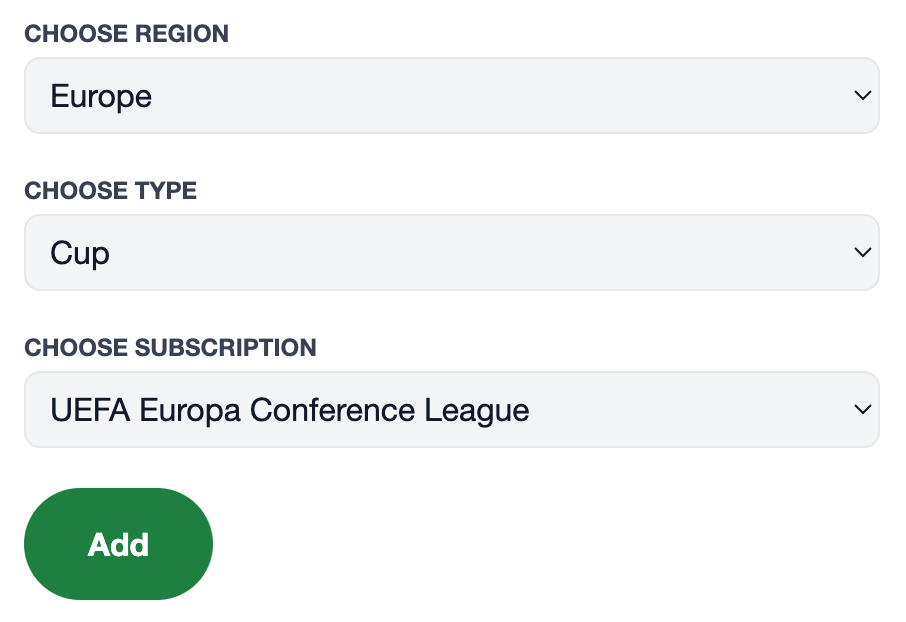
In the web interface of the bot you can make use of dropdown filters to find the correct commands to use.
First
you select the channel where you want the live notifications to appear, then filter on country and then on type (league, cup or team). This will immediately activate notifications for
that channel.
This is what the live subscription wizard looks like: